Where it started
A switcher that closed while I typed
- In our platform, you switch organisations from a menu in the sidebar. Type to find one, and the panel jumps, then closes. Open it again, scroll, click.
- An agent wrote it in one shot. It looked fine, and broke the moment you used it. Agents don’t catch this kind of bug themselves.
The question
What is the right fix, though?
- The height changing was clearly the cause. But I wasn’t sure what right looked like, and neither was the agent.
Your call
As results filter, what should the panel’s height do?
Typing “invoice” into three panels.
A jumps twice as you type. B holds, then jumps once, right as you start reading. C never jumps.
Never shrink while open. Grow-only for a dropdown, a fixed height for a ⌘K palette. Resizing “once typing stops” only moves the jump to the moment you start reading.
Principle 3 · Remove the cause, never reschedule it
Stepping back
Search turned out to be a family
- So I stopped fixing, and started learning: what kinds of search there are, how they behave over time, what applies where. There was far more to it than I’d assumed.
- Nobody had written it down for agents. The closest skills stop at ARIA roles and keys. None covers what happens while results arrive.
- Typeaheada dropdown under the box
- ⌘K palettea modal you summon
- Live results pagea page that updates as you type
- Pickerpick one from a list, like my switcher
- 7topics
- 3live teardowns
- 45rules
- 6principles
Lesson · state
The slow answer that wins
Your call
You type “typography”. The answer for “typo” was slow and lands last. What’s on screen?
Same typing, same network.
Untuned: “typo” lands last and replaces the right results. Tuned: it’s dropped.
Without a guard, whichever answer lands last wins. The fix is one check: an answer is shown only if it belongs to the current query. Cancelling old requests saves the server; the guard keeps the screen right.
Principle 1 · Every result knows its query
Lesson · time
A spinner that flashes is worse than none
Your call
Results take 200ms. The list dims after 150ms to say “loading”. What does the user see?
At 200ms, the untuned list dims for 50ms: a flicker. The tuned one, once dimmed, stays dimmed 300ms.
A 50ms flicker, three times over. Wait 150ms before showing a wait, and once shown, keep it at least 300ms. Neither number depends on the server. They come from people, so a skill can ship them.
Principle 4 · People set the timing
Lesson · arrivals
Enter opens what you chose
Your call
You arrow down to “Designers team page”. Server results arrive. You press Enter. What opens?
Local rows first, the server’s a second later.
Untuned: results land on top, the highlight stays at row 2, and Enter opens something you never chose.
If the highlight is a row number and results land above, Enter silently opens something else. Keep the highlight by ID, and let new results arrive below, in their own section.
Principle 2 · Identity, not position
Lesson · layout
Bold moves things
Your call
The matched letters are bold, as in most searches. Harmless?
Measured live, as you watch.
Bold letters are wider, so every keystroke nudges the rest of the row. Colour costs no width.
Bold letters are wider, so every keystroke nudges the row. Italic does too. Mark the match with colour or a highlight. And nothing per keystroke should animate: the more often something happens, the less it should move.
Principle 4 · Frequency sets the motion
Lesson · keys
Two keys nobody tests
Your call · 1 of 2
Text typed, panel open. You press Escape once. What should happen?
One Escape, both ways.
Untuned: one Escape closes and wipes your text. Tuned: it closes, and your text stays.
One press, one undo, smallest first: close, then clear. Never lose typed text on the way out. I added a step for the highlight; not wrong, just one press too many.
Principle 5 · The user owns the input
Your call · 2 of 2
Typing Japanese, you press Enter to confirm 東京. What should the search do?
A Japanese input method, mid-word.
Untuned: Enter opens “Tokyo office”. Tuned: Enter only confirms the characters.
While a Japanese, Chinese or Korean keyboard is composing, every key belongs to it. Safari even reports that Enter after composing ends, so the usual check misses it.
Principle 5 · The user owns the input
What it came to
Six principles under 45 rules
- 1Every result knows its queryAn answer for an old query never lands.
- 2Identity, not positionHighlight, rows and dedupe by ID, never by index.
- 3Remove the cause, never reschedule it“Dim later” and “resize later” only move the glitch.
- 4People set the timing, frequency sets the motionThe more often it happens, the less it moves.
- 5The user owns the inputFocus stays, text is never lost, the keyboard’s keys are the keyboard’s.
- 6Prove it in framesA 36ms blink and a working guard both look fine live.
The playground
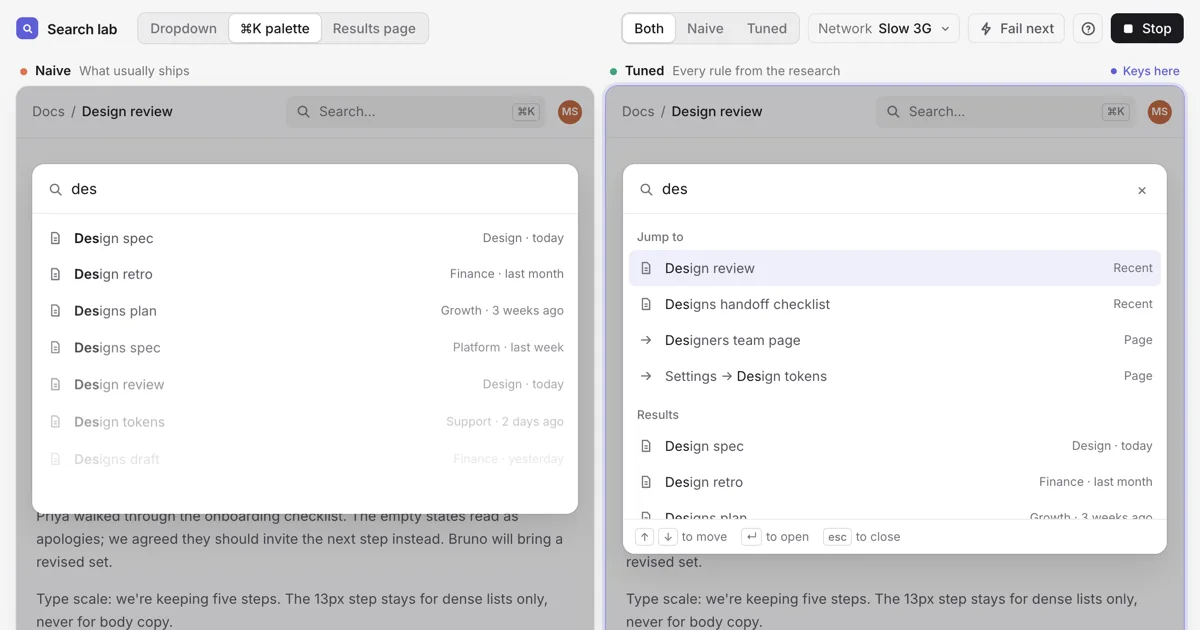
A lab to feel the difference
- The same search twice, naive and tuned, side by side, on the same network. A dropdown, a ⌘K palette and a results page, from fast wifi down to slow 3G, with a button that fails the next request.
The skill
Tune our search, in one prompt
- Ask your agent to “tune our search”. It finds every search in the product, takes over the network in a real browser (slow, failing, out of order) and judges each frame.
- You get a report with the evidence. Reply “go” and it makes the safe fixes; anything that changes content waits for you.
- Find Every search typeahead, palette, results page or picker
- Audit 12 checks, frame by frame slow, failing and out-of-order networks
- Your go One word safe fixes made; questions wait for you
- Prove Audit again the same checks, before and after
nothing in your code changes before your go
How it’s tested
Every check had to catch something first
- A check is trusted only after it fails something broken and passes something right. The lab is both.
- Then the real test: a fresh agent that had never seen our conversation, given only the skill and a scrubbed copy of the naive search. It fixed everything, and found a bug in the harness on the way.
- 12 Checks, each proven to bite Every one fails the lab’s naive search and passes the tuned one
- 33 → 0 A fresh agent, only the skill On a scrubbed copy: 33 failures found, none left on checks it never saw
- 18 Notes back into the skill That same agent found the harness’s subtlest bug
- 36ms Wikipedia’s loading row On screen for 36ms. Invisible live, obvious in frames
Back to the switcher
Two bugs were one
- The panel was too tall for the space below its row, so it was pushed up against the screen’s edge. Filter, it shrinks, it no longer needs pushing, and it drops. The pointer is left outside, and a hover menu closes.
- So the jump and the closing were one bug, and one rule fixed both: never shrink while open. The skill also kept focus in the search, fixed Escape, and turned off autocorrect.
Misses & lessons
What I’d tell day-zero me
-
MissAsked for a fix before I knew what right looked like.
LessonStep back and learn the thing. Once I could name the bug, the fix was one rule.
-
MissFixed a flicker by doing it later: dim later, resize later.
LessonMoving a glitch doesn’t remove it. Remove its cause.
-
MissWatched it live and called it fine.
LessonThese bugs last 36ms, or look like waiting. Look at frames.
-
MissTrusted the tuned version because we wrote it.
LessonTest equipment is a product. A check counts only once it fails something broken.
NextMy switcher is a picker, so it ran the layout and keyboard checks. The timing checks are proven on the lab; next is a server-backed search in a real product.
Learnt from
- Nielsen Norman GroupResponse times: the 3 important limitsWhy 100ms and 1s, from Card, Miller and Nielsen.
- smeijerspin-delayThe delay and minimum pair, as a library.
- W3CARIA combobox patternThe keyboard and screen reader contract.
- Emil KowalskiDesign engineering skillsMotion by frequency, not size.
- thedaviddiasUX patterns for developersThe closest prior art: search, autocomplete and palette cards.
Search is one box. Inside it: a state machine, a clock, a list that moves and a keyboard contract. Now tuning it is a prompt away.The skill · open source Does your search jump, flicker or lie? Ask your agent to
tune-search: an audit under real networks, a report you decide from, and fixes in your own code.
npx skills@latest add marigameo/skills
Open it on GitHub