The brand kit extractor is how Strive learns what a customer’s brand looks like. During onboarding we read their website, and keep its colours, type, corners and the rules for using them as one file in our knowledge base. Any agent can read it. Reports were the first to.
Extract once, read anywhere.
A little bit of backstory
Every report Strive Studio wrote came out in our own brand: orange #F97316, slate surfaces and Inter. Not by choice. The report skill’s 411-line prompt had them hardcoded.
Then one of our clients told us, a little vaguely, that the artifacts they’d made with Claude looked better than our reports. On checking, we felt that applying their brand context would close most of that gap.
So I benchmarked how a similar product builds its brand kits, read through the open-source tools, and designed the experience end to end, from onboarding to the page where a customer edits their kit. I got to build all of it too: the client, the server, the design and the prompt engineering in the skill. Our CTO reviewed the code and helped sharpen the backend along the way.
The one-liner
Read the customer’s website once, at onboarding. Turn it into a small design spec with one LLM call, check every value on the server, and save it as a knowledge-base file that any agent can read.
- Onboarding A domain on record from the brand details we already keep
- Scrape The raw page head, styles and stylesheets intact
- One LLM call A spec in a strict schema tokens, plus written usage rules
- Checks Saved, or not at all as brand/design.md in the knowledge base
any agent reads it, like any other file in the knowledge base
It’s a plain server pipeline rather than one more agent task in onboarding. Nothing unpredictable sits between the scrape and the write, and the same code serves onboarding and the refresh button.
A platform module, not a reports feature
It would have been easy to build this as a report setting. But nothing about a brand is specific to reports. A chat answer, an artifact or an email should look like the customer just as much.
So the kit is a standard knowledge-base file, brand/design.md, and the file is the entire interface.
- The writer and the reader never meet. A seeder writes the file, and the report agent reads it from its sandbox like any other knowledge-base file. The seeder can fail, or never run, and reports still work.
- Brand, not craft. The kit holds brand tokens only. Layout archetypes, KPI recipes, grids and chart conventions stay in the report skill.
- Ready for the next reader. Logo, dark logo and favicon live in the kit even though reports don’t draw them yet, so emails, embeds or decks can pick them up without another schema change.
Their website
The page, its stylesheets and every colour on it
Knowledge base
brand/design.md
Tokens up top, usage rules below. Editable, and gated on every write
- Reports live the first reader: brand colour, series, surfaces, fonts, corners
- Chat answers blocks in their colours
- Chat artifacts agent-written pages
- Emails and decks logo, type, palette
Reading a brand off a website
This was the hardest part to get right, and where I learned the most.
Let the model read, not a parser
The obvious first idea is to parse the CSS. It finds hundreds of hex codes, and it can’t tell a button fill from a border. A model can, if you tell it where to look.
So one LLM call reads the raw page and its stylesheets, with a confidence rule borrowed from dembrandt: colours on the logo or a call to action count most, the nav counts a little, and browser chrome doesn’t count at all.
CSS heuristics
- Hundreds of hex codes per page
- A button fill looks like a border
- No idea how the brand uses them
One LLM call · anchoredthe call
- Reads the page and its stylesheets
- Weighs the logo and CTAs over the chrome
- Writes how the brand uses each colour
Count every colour on the page
My first pipeline sliced the page before the model saw it. That held until one of our clients’ sites, built on Framer, shipped a 616 KB <head> inside a 2.9 MB document. The slice sent the model zero colours, and it confidently invented a jade green for a blue brand.
So the server now counts every literal colour (#hex, rgb() and hsl()) across the whole document and its stylesheets, and hands the model the ranked list. The head and body are found in the full page and trimmed afterwards, never sliced first. The same count later became the evidence every returned colour is checked against.
Hand the model the evidence, not a prefix.
Logos hide in odd places
Sites that draw their mark as an inline SVG have no logo-like <img> at all. So logo candidates are ranked: the site’s own JSON-LD Organization.logo first, then logo-like images, then og:image last, with a warning in the prompt that share images are usually banners.
Fetching the page as it really is
Our existing scrape action cleaned the HTML, which stripped exactly the <head>, styles and stylesheet links this needed. So I added a second action, scrape_raw_website, to the same app, reached through the app manager like every other app action. Importing the scraper straight into the server would have been quicker, and would have broken the boundary the apps exist for.
Under it, scrape.do with rendering goes first: it runs the page’s JavaScript, only bills for successful calls, and worked out about four to five times cheaper. Firecrawl is the fallback.
What we passed on
A few ready-made options came close. None of them was the whole answer.
| Option | What it does | Why we passed |
|---|---|---|
| dembrandt | An open-source CLI that extracts a site’s tokens and can write a DESIGN.md | Needs a Playwright browser our server doesn’t have, and still needs an LLM pass after. Its confidence tiers and DESIGN.md sections inspired our prompt |
| Context.dev | A brand API: logo, colours and fonts from a domain | Pricing was fine. Coverage of long-tail small-business domains was the worry, and it didn’t beat a live scrape on reliability. A trial is parked for later |
| Brandfetch | Logo and colour lookup by domain | No usage rules, and one more vendor for a subset of what one LLM call already returns |
A guessed colour never ships
A wrong brand colour is worse than no brand colour. Our orange at least looks intentional. So between the model and the file sit a few checks, and any of them can say no.
- Shape A strict schema parsed, then validated again on the server
- Confidence Is it sure? a low-confidence primary is thrown away
- Grounding Is it on the page? every colour checked against the census
- Contrast Does it hold on white? 2.2:1, or a darker shade, or nothing
any check says no: nothing is written, and our default stays
- Never trust the model’s arithmetic. It returns one hex. The server derives the RGB triple the charts need and the darker shade for hovers.
- Make honesty cheap. The schema makes the model say which tier its primary came from, and the prompt tells it a low answer is discarded, not shipped.
- Every colour must exist on the page. An invented primary rejects the whole extraction. An invented secondary is dropped, and the rest of the kit still lands.
- Contrast catches the classic mistake. Picking a near-white background as “the brand colour” fails on white, so a darker shade is tried, and if that fails too, nothing is written.
Degrade, don’t reject
The same rules run again on every write to the file, whether it comes from the seeder, the editor or the API. That way a report can trust the kit at rest, instead of every reader re-checking it.
- Series colours. A secondary or accent must hold on white and differ from the colours already in a slot. Otherwise it’s stored as empty, and charts fall back to their own palette.
- The surface pair. Background and text are adopted together: only on a light site, only when the background stays close to white, and only when the text clears WCAG AA on it. Any failure drops both, so a report never prints dark ink on dark paper.
- Fonts. Family names are limited to letters, numbers and spaces, because a report copies them into CSS, a script and a Google Fonts URL. Anything else drops to the default.
- The primary. The one value that can refuse a save, because every accent and chart stroke depends on it.
Degrade, don’t reject. Only the primary can fail a write.
The stylesheet fetch
One miss worth owning. My first version had our server fetch the stylesheet links it found in the scraped page. Those URLs come from a page the customer controls, and the bytes flowed into the prompt and could come back out through the saved usage rules.
Now both fetches happen inside the scrape action, so the server never fetches a page-supplied URL itself. Every stylesheet link also passes the same URL safety check our blog crawler already used, which blocks private ranges and cloud metadata endpoints.
Customised kits are left alone
A kit marked custom is never overwritten by an automated run. It’s checked before the scrape, so a customer who has made it theirs costs us nothing, and checked again inside the writer. Every rejection path is tested, along with the status it records.
A file, not a prompt
My first version composed the report skill per customer when it loaded, baking their tokens into the prompt. It worked, until I remembered skills are also mirrored into each sandbox as SKILL.md. The copy the agent could see showed our orange, while the one we served showed the customer’s brand.
So the skill went back to being one static document, with one new section: read knowledge_hub/brand/design.md before writing the report, and here’s how to map what you find.
Composed per customer
- Tokens baked into the prompt at load
- The sandbox copy says something else
- A function’s output, hard to review
A static skill reads the filethe fix
- One document, the same for everyone
- The kit read like any other file
- Diffable, with a default for every gap
The section is explicit about the three cases, because a vague instruction here means a report that stalls or asks:
- No file, or an unreadable one. Use the documented defaults. Never block, never ask, never mention it in the report.
- A token is empty. Default that token only. The kit isn’t all or nothing.
- A token has a value. Apply it as it is. Values in the file are already checked, so don’t lighten or “improve” them.
Tokens drive the report’s CSS. The prose under them, in ## Colors, ## Typography and ## Logo usage sections loosely following the DESIGN.md convention, tells the agent how the brand actually uses them. Here’s the shape of a kit:
---display_name: Design Pagesource: extracted # default · extracted · customextracted_from: yourbrand.comtheme: lightbrand_primary_hex: "#4F46E5"brand_primary_rgb: "79, 70, 229" # derived on the serverbrand_primary_strong_hex: "#3932A5" # derived, 28% darkerbrand_secondary_hex: "#0EA5E9"brand_accent_hex: null # dropped: too close to primarybackground_hex: "#FAFAFF"text_hex: "#1E1B4B"font_primary: Manropefont_heading: null # empty → Interborder_radius: lglogo_url: https://yourbrand.com/logo.svg---## ColorsIndigo leads every call to action, and nothing else.Sky blue supports charts, never buttons.The usage rules apply inside the skill’s own visual contract, which wins on a conflict. Brand colour still goes in four places and no more, and no customer rule can widen that.
Make it the platform’s, not the feature’s
The backend went through the same lesson. My first cut gave the feature its own router, its own status endpoint and an environment flag. Each was reasonable on its own. Together they made a brand kit a special case.
- One seed route.
POST /knowledge_hub/seedtakes a path, and a path-to-seeder map does the rest. The next derived file is a registry entry, not a router. - Status lives on the file. The seeder lays down our default kit first, then marks its row processing, processed or failed. No side channel: the knowledge base reads it from the row it already has.
- Outcomes, not errors. A rejected extraction is a 200 with a status like
rejected_low_contrast. Nothing broke, and the customer keeps the kit they had. The client turns each status into a plain-language toast. - Safety in the seeder, not a flag. It ships on for everyone. A customised kit is never overwritten without
force, and every failure leaves the default in place.
Onboarding runs it as a background job, which retries only infrastructure failures, never a rejection, since that would repeat the same answer at full cost. A refresh from the page runs it on demand, in about 15 to 40 seconds.
The page where a brand becomes yours
This was my favourite part to design. A kit read off a website is a good first guess. The page is where a customer makes it right.
I designed the page the way I’d whiteboard today: in code, in Claude Design, with our design system loaded and a live report beside every tweak.
Colours
-
Primary
#4F46E5 -
Secondary
#0EA5E9 -
Accent
–
empty -
Background
#FAFAFF -
Text
#1E1B4B
Type and shape
- Heading font Manrope
- Body font Inter
- Corner radius lg
- Theme Light
Logos
- Logo
yourbrand.com/logo.svg
Usage rules Edit
- Indigo leads every call to action, and nothing else.
- Sky blue supports charts, never buttons.
Live preview
Live · updates as you edit
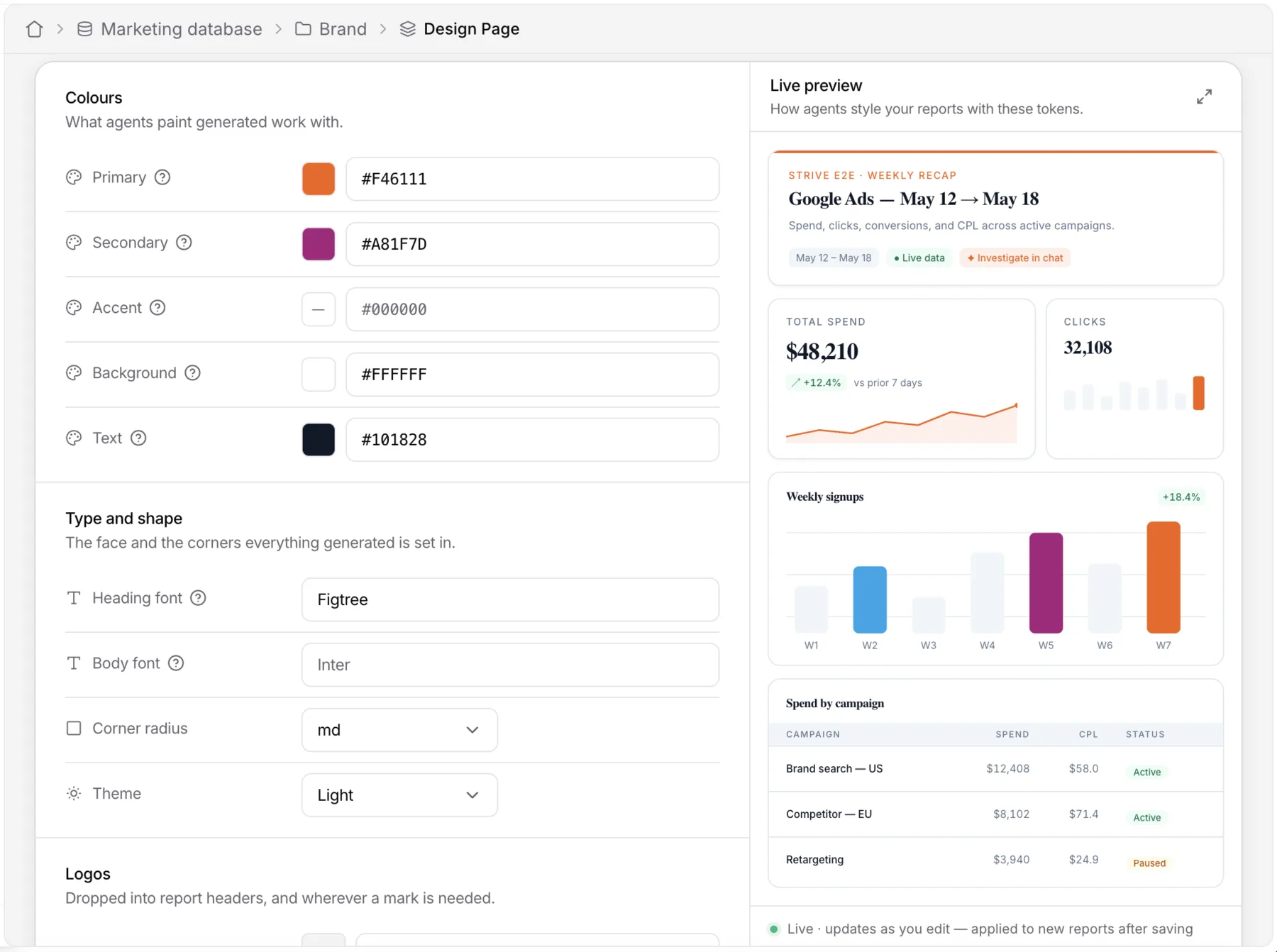
- A live preview beside the form. A sample report repaints in your colours, fonts and corners as you edit, and new reports pick them up once you save.
- Every token explains itself. A short help tip on each row says what reports use it for.
- Honest about the default. Until a kit is extracted, the page says plainly that this is the platform’s design system, not your brand. If extraction failed, an amber note says so and points to editing or retrying.
- Edited inline, like Notion. Every property is a row, with a native colour picker beside a hex input, drafting into a floating save bar. The usage rules are editable too.
- The preview tells the truth. It runs the same checks as the server, so a token that won’t survive is shown as kept but not applied, instead of painted. A dark site previews light, because reports are light for now.
- The form can’t let through what the server will refuse. Hex, font and URL fields validate inline, and a pasted URL without a scheme becomes
https://on blur. - Refresh asks first. If the kit carries your edits, refreshing from the website confirms before overwriting them. Leaving with unsaved edits asks too.
Adding a second standardised page also forced a small client refactor: six places hardcoded the brand-details page, and now one registry does. It fixed a latent bug on the way, where the new page’s placeholder row would have opened brand details instead.
Existing customers weren’t backfilled. They start on the default kit, and can fill theirs in from this page, or refresh it from their website, whenever they like.
What I’d keep
- Build it for the platform, ship it for one reader. Reports read the kit first; anything else can read the same file tomorrow.
- Measure the whole page before you trim it. A prefix once handed the model zero colours, and it filled the gap with a guess.
- Let the model judge, never let it count. It picks the brand colour. The server derives the rest and checks it.
- Degrade, don’t reject. One bad token drops to empty, and the rest of the brand still lands.
- Context belongs in a file, not a prompt. The skill stays one reviewable document, and the agent reads the kit like any other knowledge.
- Make the preview tell the truth. Run the server’s checks in the editor, so what you see is what the report gets.
What’s next
- More readers. Chat answers, artifacts, emails and decks can pick up the kit the day they need it.
- Logos in reports. Once we have stable public asset URLs to point at.
- Dark reports. The theme is stored, but reports stay light for now. Dark means re-deriving the whole neutral ramp.
- Saying when a brand was dropped. On the report itself, not only on the design page.
- Safer concurrent saves. Two tabs still resolve last write wins.
Reports just happened to ask first. Every surface that comes after gets the brand for free.
Thanks
Thanks to the client whose nudge started this, and to our CTO for the careful reviews that made the backend sharper than I’d have managed alone. And to the whole team at Strivelabs, for building the platform this plugs into.