Backstory
Files that carry data
- Our knowledge base keeps what Strive’s agents know about each customer as
.mdfiles: brand, audiences, competitors and more. Many open with frontmatter, a block of named values like a domain or a brand name, above the free text. - Both halves are context for the agents, and people need to edit both. So the question was how to show properties so they’re easy to edit, preview and maintain, without looking like a thing apart from the content.
Where it started
Blocks and a side panel
- My experience with frontmatter came mostly from CMSs. So the first idea took after CMS block editing: content paired with editor blocks, and a click that opens a panel on the right to edit the properties.
- In a CMS, those properties are mostly not plain text. Ours were. A KB file is content heavy, and its properties are words and links too. So I went looking for what fits a document full of both.
Homework
Patterns before products
- Notion was the first place I looked, as I use it heavily. Linear was another inspiration. But more than products, I wanted to learn the patterns.
- Talking it through with LLMs turned up a few: inline property chips, property cards and highlighted callout blocks, next to the plain list. The cards felt closest to where I started, so I tried them first.
- Inline chips values inside the sentences
- Property cards a box for every value
- Callout block one highlighted block on top
- Property list a row each, then the doc
cards first, the list in the end
Smudge · property cards
Boxes, boxes
- The cards gave the document a rich feel, inline with the text, with a panel on the right to edit them. I didn’t think about how they scale. As the number of properties grew, the page turned into boxes, boxes.
- And editing meant jumping from one area of focus to another, then keeping the two in sync. Structured and unstructured context had become two separate things, each with a playground of its own.
Details Page
Updated 2 hours ago
Brand properties 4
Positioning
Acme is the marketing automation platform for B2B SaaS teams. It replaces a stack of point tools with one workflow-driven system.
- One platform instead of five point tools.
- Outcomes first: pipeline and revenue.
- Agentic workflows, with a human in the loop.
Options · prototyped in Claude
Three ways in
- So I stepped back and prototyped three directions in Claude, with the same content in each. All three drop the card-in-card chrome.
- Each answers a different question first: what is this file, where is it in the tree, and how do I change it.
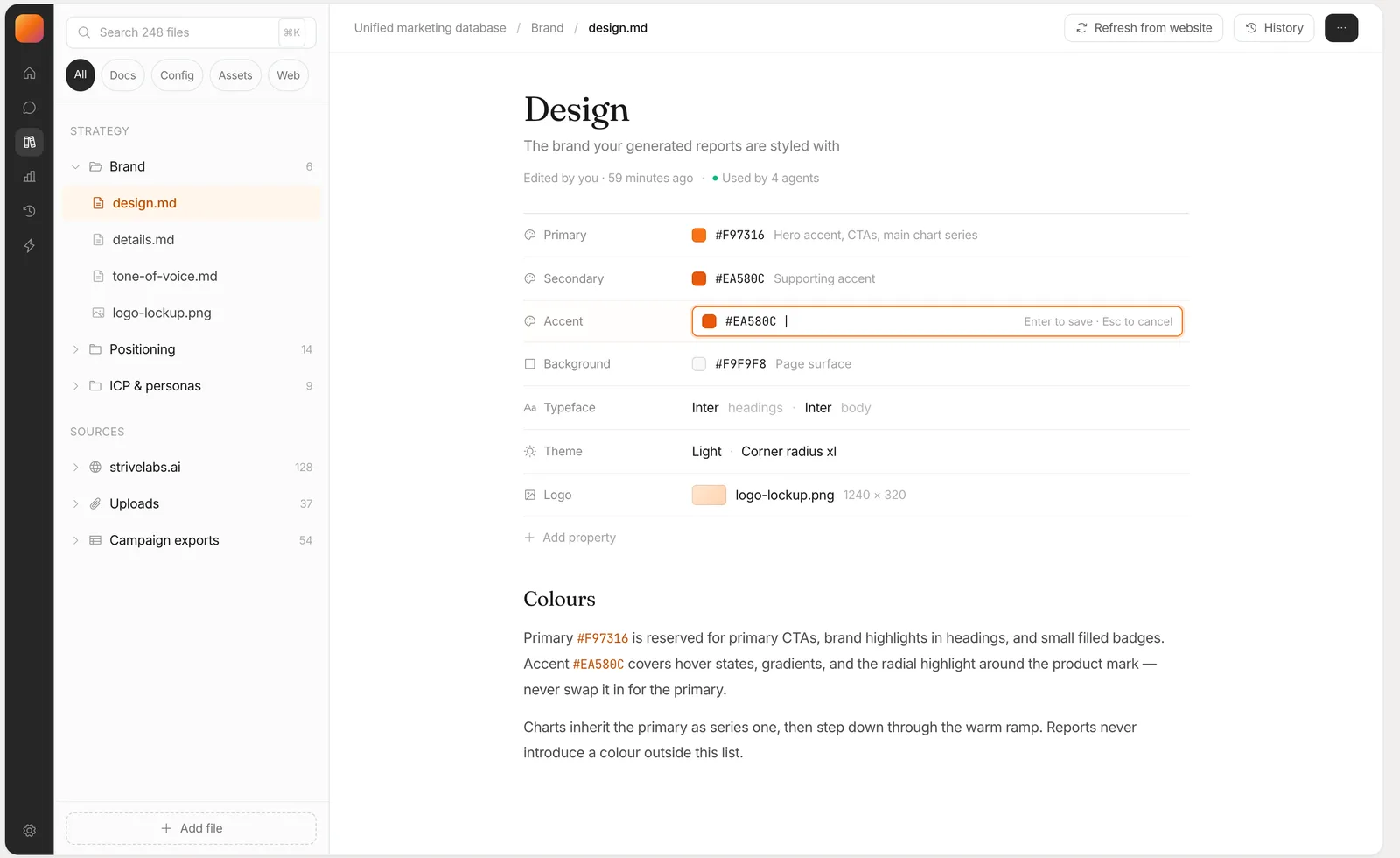
1aDocument-firstfrontmatter as a property table
- Fits when
- Docs people read more than they edit, where properties and prose belong together. Every row edits in place, so editing is never a mode.
- Asks for
- Only what every file already has: its frontmatter and its body.
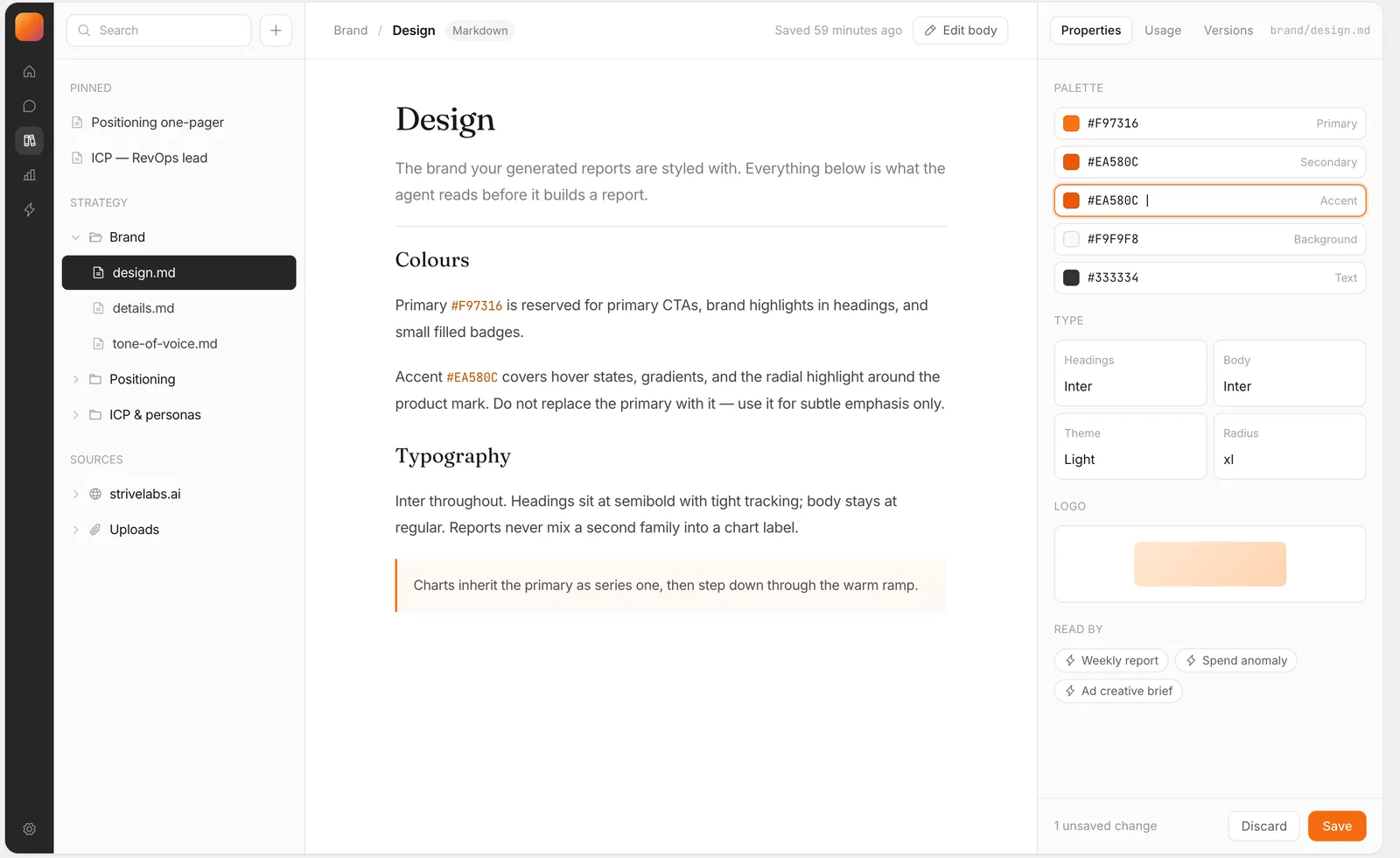
1bReader plus inspectorthe panel stops repeating the page
- Fits when
- Long docs with a lot of structure. The reading column stays clean, and the inspector is always open, so it never moves the text.
- Asks for
- Usage and versions for every file from the backend. And a second place to look and keep in sync, the split I was moving away from.
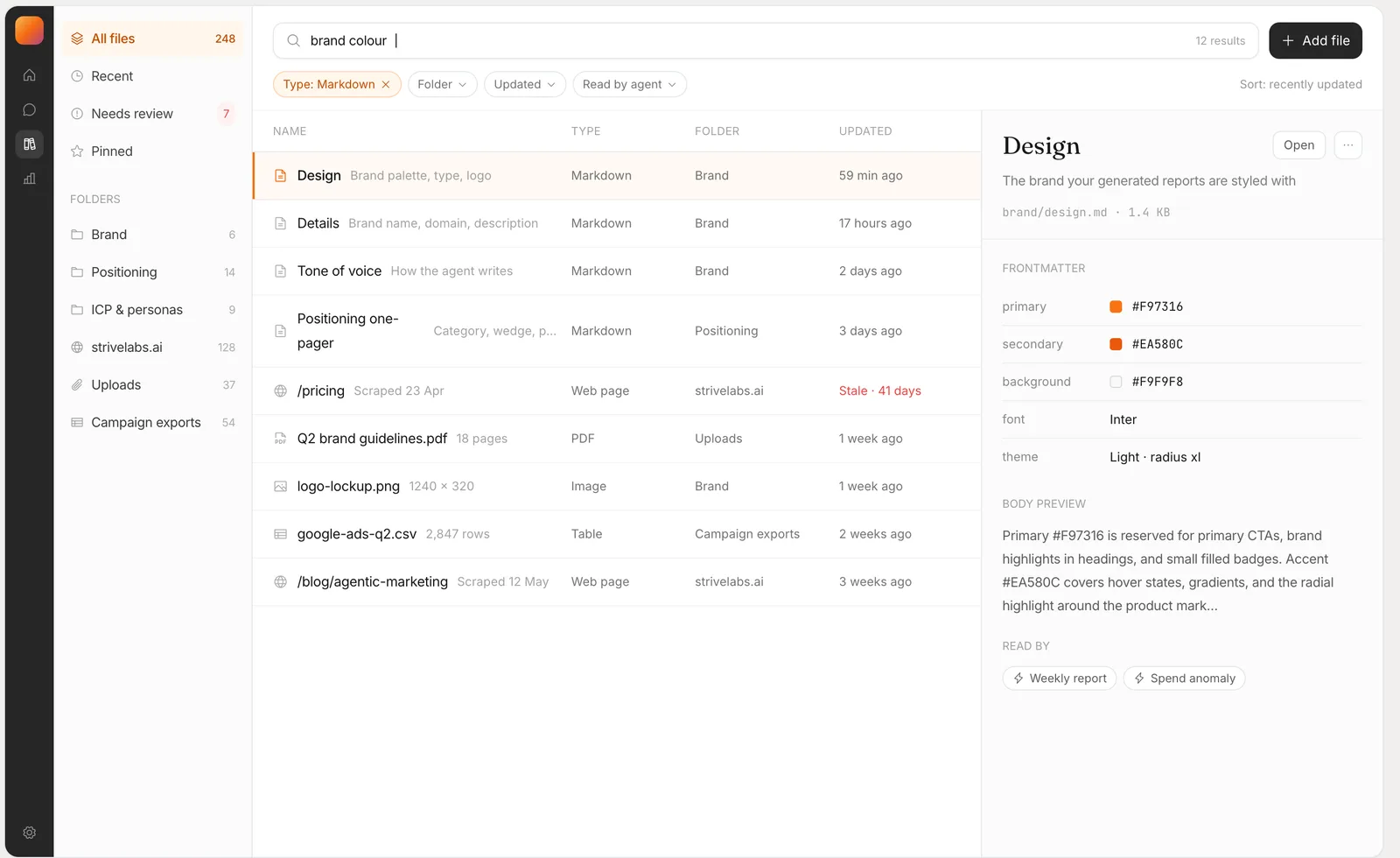
1cBrowser-firstsearch and a table are the home screen
- Fits when
- Hundreds of files, where search and filters beat the tree. A row opens a preview, and one more click opens the doc, drawn as in 1a.
- Asks for
- The type, source, freshness and reading agents of every file, across every folder.
Design call
One document, one editor
- I went with 1a, the Notion-style one. The main reason was the UX: properties and content shouldn’t feel like two things, each with a space of its own. One simple document can hold both the structured and the unstructured context the agents read.
- It also fit what our backend holds and can return. 1b and 1c leaned on data about every file that we didn’t have. 1a needed only the frontmatter and the body.
- Then I checked it against every combination, from a file of only properties to one row over a long doc, until it held as one model for the whole platform.
- Only properties rows in sections, each with a line on why
- Properties and text the rows, then the doc
- Mostly text one row over a long doc
What’s live
Properties up top, the doc below
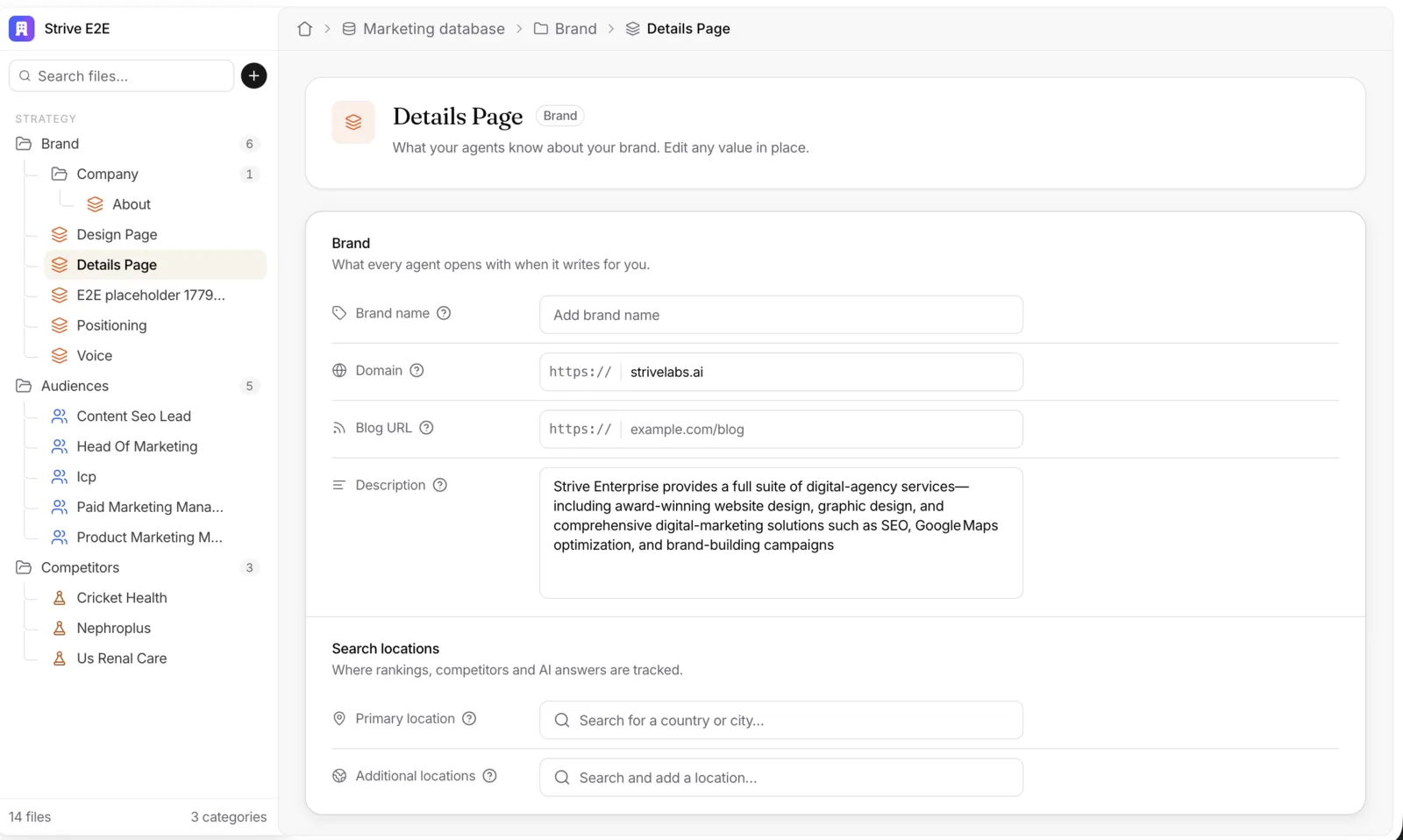
- Every file opens the same way: an icon, a title, its folder and a line about it. Then the properties as a list, each with an icon, a label, a help tip and a field that edits in place. Then the doc.
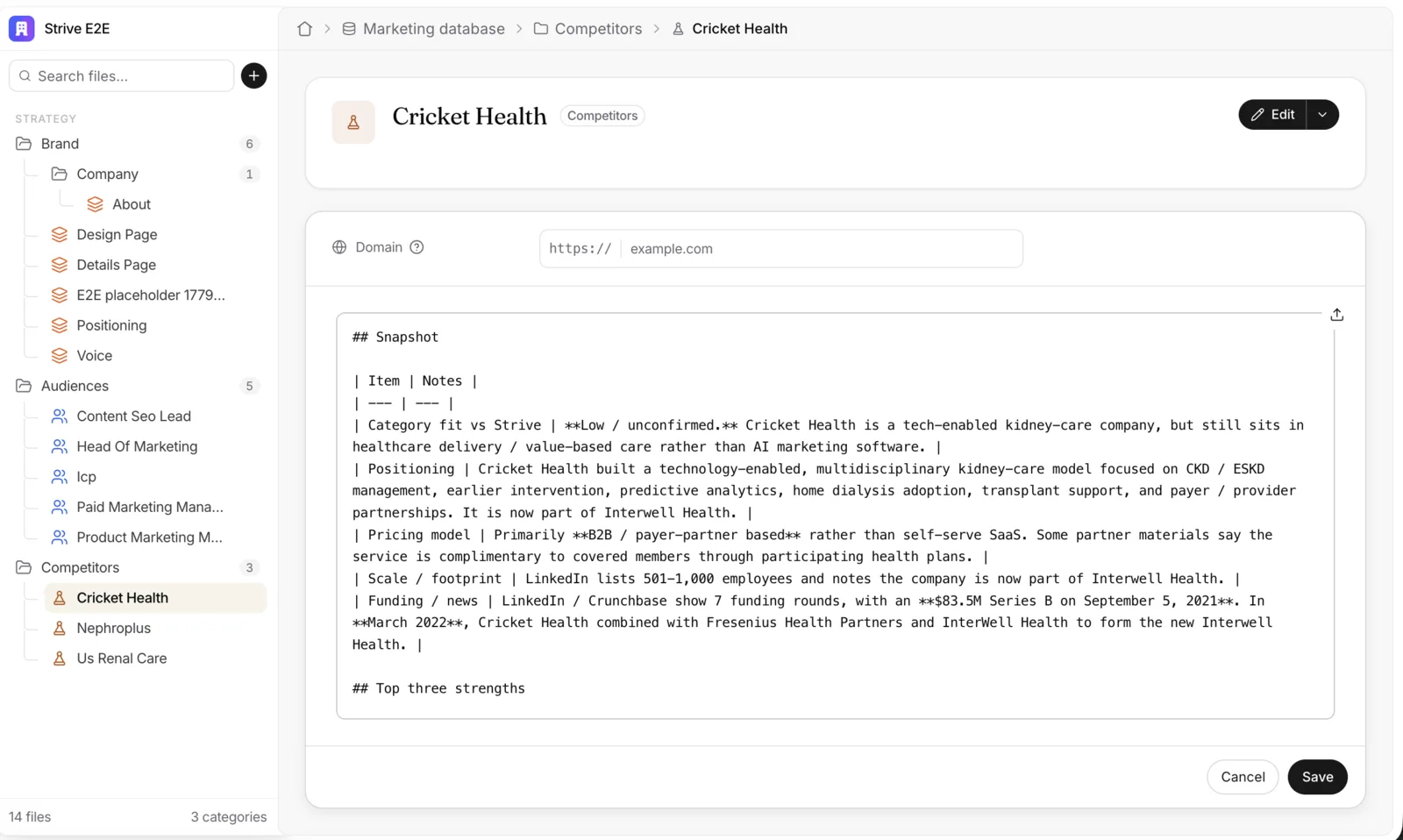
- The body reads as a rendered preview. Edit opens it in an editor of its own, as markdown, while the properties stay right where they were.
1
2
3
4
- The same header on every file. Icon, title, its folder and a line about it.
- Properties as rows. A label, a help tip and a field. A competitor has just one: its domain.
- The doc, rendered. What the agents read, as a preview, with a copy button.
- Edit, one click away. It opens the body in an editor of its own.
1
2
3
4
- Sections, each with a line on why. “What every agent opens with when it writes for you.”
- A help tip on every label. What the value is for, without leaving the page.
- Fields that fit the value. A URL keeps its
https://prefix, and a description gets room to wrap. - Locations you search for. Where rankings, competitors and AI answers are tracked.
1
2
3
- Properties stay put. They still edit in place, above the body.
- The body as markdown. An editor of its own for the free text, in the same card.
- Cancel or Save. Then it reads as a preview again.
What dried
What I’d keep
-
MissChose property cards for the rich feel, without asking how they scale.
LessonDesign for the count, not the demo. Ask how it looks with one property and with many.
-
MissPut editing in a panel on the right, away from the text it changes.
LessonDon’t make people jump between two areas of focus and keep them in sync. Edit in place, in one editor.
-
LessonLearn the patterns, not only the products. A pattern is what carries over to the next screen.
Structured or not, it’s all context. Keep it in one document.