Every agent on Strive needs a way to reach the people who use it: a page to set it up, a way to start it, and somewhere to review what it did.
This post is the journey of how we built those interfaces, from June 2025 to today, and how the answer to “who writes the UI?” kept changing.
Each step handed a little more of the UI to the agent.
The one-liner
We went from developers writing every screen, to coding agents writing them on our rails, to a chat that answers in generated UI, to agents writing their own.
- Scaffold Developers write the screens on our hooks and ui-core
- Routes Coding agents write them too following the guide and a similar agent
- Gen UI chat The agent composes our components one chat, generated UI
- Studio The agent writes its own UI HTML in a sandboxed canvas
each step hands a little more of the UI to the agent
A little bit of backstory
It started in June 2025. As a team, we were building agent prototypes for different use cases, from our early clients and friends.
We already had a solid backend for orchestrating workflows quickly. Almost anything you can do in n8n, you could do on our platform. So the idea was simple: build a UI for each workflow fast, demo it to customers, validate the idea, and find product-market fit.
It began with a tip from our CTO: come up with one standard way of putting a UI on an agent. The backend was already plug and play. Agent builders could drop components into a DAG and have a workflow ready in no time. The challenge was doing the same for the UI.
The backend · already plug and play
- Components dropped into a DAG
- Almost anything n8n can do
- A workflow ready in no time
The UI · the same ideathe tip
- Screens every agent shares
- Layouts and hooks from a scaffold
- Builders wire data, nothing else
Most agents needed the same few pages: one to configure the agent, one to install it, and one to review what it did and check its status. Configuration-driven UI was the long-term goal, but it wasn’t ready for the first agents, and we weren’t going to wait for it.
So our CTO proposed screens: a standard set of pages every agent plugs into. I formulated the framework around it, in React. I wrote the doc, built the abstractions over the router and the store, and made the scaffold, the hooks and everything around them. The rest of the team used the framework to build their agents.
A builder for us, not for everyone
At first we pictured this becoming our external developer experience too. A lightweight agent-builder framework, where anyone could build agents on Strive the same way we did. To get there, we’d build more agents ourselves, improve the DX over time, and open it up once it was stable.
But we didn’t want to enter the agent-builder space. It was already crowded, with n8n, Lindy, Make and Relevance AI, and we wouldn’t have had a real reason to stand out.
A public agent builder
- A lightweight agent-builder framework for anyone
- A crowded space already
- No clear way to stand out
Internal DX · reliable agentsthe call
- Our own builders, moving fast
- Interfaces we could open up later
- Agents that do the job, with no slop
It wasn’t that we lacked the pieces. We had everything. We knew how to build one; we’d done it before, and we could power it later if the demand came. For now, we wanted to stand out in a crowded agent space with agents that were effective and reliable.
So the focus became our own developer experience: helping the team build agent UIs fast. The line at the end of the handover guide sums it up:
The platform handles the complexity. You focus on the business logic that’s specific to your agent.
One command to a working agent
The simplest way to make agent interfaces pluggable was a good scaffold. If it came with every capability wired up and a working example, builders could focus on the agent and fill in the interface.
So pnpm clone-agent-template <agent-name> writes a new folder under src/agents/ with a minimal agent that already triggers a workflow, shows progress and renders output.
Terminal
pnpm clone-agent-template my-agent
src/agents/my-agent/
-
constants/index.tsnode IDs and the steps for the progress view you set -
screens/TriggerScreen.tsxa validated form that starts the run you change -
screens/LoadingScreen.tsxlive, step-by-step progress ready -
screens/OutputScreen.tsxoutput, errors, try again, copy you shape -
assets/room for the agent’s own images empty
a working agent on the very first run
| File | What’s in it |
|---|---|
constants/index.ts | A target node ID placeholder, and a two-node list the progress view reads |
TriggerScreen.tsx | A react-hook-form and zod form with two sample fields and validation, whose submit starts the workflow |
LoadingScreen.tsx | A card around StepLoadingProgress, fed by the node list |
OutputScreen.tsx | Loading and error states, “Try again”, a copy button and a JSON preview of the result, ready to be replaced |
After it runs, the script prints the next steps: set the node IDs, change the form fields, shape the output view. Nobody starts from a blank folder.
Builders only needed to know how to call the backend and wire its data to the screens. No new components, no thinking about padding or colours, and no need to learn React Router or how state works in Zustand.
The platform handles the complexity
An agent’s run has three moments: start a workflow, read its output, start over. I gave each one a hook, and made the hooks the only way in.
You write
The formThe data mappingThe output view
-
useAgentWorkflowTriggerstart a run -
useAgentOutputread its output -
useAgentResetstart over
Handled for you
The Zustand storeWorkflow APIsPollingExecution IDsAgent statesDefault error alerts
Here’s an agent’s whole run, from the builder’s side.
// TriggerScreen: start a runconst { trigger, isLoading } = useAgentWorkflowTrigger();trigger({ data: [{ data: formValues, scenario: "default" }], callbacks: { onSuccess: (executionId) => { /* agent-specific */ } },});// OutputScreen: read only the node you care aboutconst { getNodeOutput, hasData, error } = useAgentOutput({ targetNodeIds: [nodeIds.TARGET_NODE], transformOutput: (raw) => toRows(raw),});// “New session”: back to the formconst { resetAgent } = useAgentReset();useAgentWorkflowTriggerowns the start. It checks there’s an active workflow instance, calls the trigger, stores the execution ID, moves the agent to Loading, shows a default error and resets on failure. Each part can be overridden when an agent really needs it.useAgentOutputowns the result. It finds the latest completed run, polls node state, pulls out only the nodes asked for and runs an optional transform. It also lists past runs, for a report switcher.useAgentResetowns “new session”. It clears the execution ID and takes the agent back to Idle.
Agent-specific behaviour goes in the callbacks. Anything else an agent needed later, like configuration, approvals or reading task queues, got a hook of its own, so builders kept calling hooks instead of reaching into the store.
Make the right way the short way.
Consistent by default
Consistency was the part I cared about most as a design engineer. Agents built by different people could easily end up as different products.
So the template uses only our component registry, @strivelabs/ui-core, and lucide-react icons, and every agent moves through the same three screens.
-
Idle
a validated formTriggerScreen -
Loading
the same step progressLoadingScreen -
Completed
output, copy, try againOutputScreen
try again resets it to Idle
- One set of parts. Cards, buttons, inputs, tabs and the rest come from
ui-core. A new agent looks like the rest of the platform on its first run. - One way to show progress.
StepLoadingProgresswalks through the workflow’s nodes while a run is in flight, on every agent. - One way to validate.
react-hook-formwithzod, already wired into the template. - Small shared utilities. Copy to clipboard with feedback, and one logger instead of
console.*. - Data apart from presentation. Shape the payload in the trigger screen and the result in
transformOutput, never in the JSX.
Here’s one of the first agents built that way, the Google Ads campaign analyser. Like most of them, it was a rapid prototype I designed straight in code.
IdleTriggerScreen
configure is a screen of its own
CompletedOutputScreen
a way into chat, early on
The easiest path should be the consistent one.
Relax the rails
Within a month, the screens felt too restrictive. They kept every agent inside one narrow model of a UI, just as we started building agents that went in completely different directions.
A couple of content agents needed rich, multi-view flows. A sales agent needed far less, and none of those components. Squeezing both into the same set of screens helped neither of them.
The screen tree was part of the problem. It picked a screen from a state in the store and loaded it by folder name. That kept things simple, but you couldn’t share a view, refresh it or come back to it.
Before · a screen tree
- A screen picked from store state
- Loaded by folder name
- One URL for the whole agent
Now · route-basedroutes
- Every view has its own URL
- Share, refresh, deep-link, go back
- One shared layout for queue agents
So in July 2025, I relaxed it. Path-based routing took the one-model limit away: each new agent registers its own routes, declares its views and a layout, and adds one line to App.tsx. Agents that work through a queue of tasks, like the content agents, share one layout, so a new one is only a short wrapper.
It worked because of who was building by then. The team was building with coding agents, which could put together an interface that fits from our primitives, as long as the rails were clear. More on that in the next section.
Fit the interface to the use case, not the use case to the interface.
// App.tsx: above the generic route, or the generic layout catches it first<Route path="/ui/agent/my-agent/*" element={<MyAgentLayout />} /><Route path="/ui/agent/:agentId" element={<AgentLayout />} />// a queue-style agent: a short wrapper around the shared layout<BlogContentAgentLayout agentShortName="my-agent" routes={ROUTES} bucketConfig={buckets} screens={{ Trigger, Output, Result, Review }}/>Here’s one of the content agents on that shared layout. Four views, one short wrapper, and a URL for each.
-
1Triggera URL and keywords to refresh
-
2Outputthe queue, with a status per brief
-
3Resultthe draft, with an AI edit inline
-
4Reviewapprove or reject each suggestion
every view has its own URL: share it, refresh it, come back to it
- Two data shapes, one set of hooks. Some agents run one workflow per submit and read one node’s output. Others work through a queue of tasks, with a table that refreshes every 15 seconds and no loading screen at all.
- Order matters. An agent’s route has to sit above the generic one, or the generic layout catches it first.
- Chat could link straight in. Once every view had a URL, a link from chat could land on the right page of an agent.
Both patterns still live side by side, on the same hooks and the same backend. Only rendering and navigation differ.
When coding agents became builders too
By this time, agentic coding had become far more accessible, and far better. Our team was using coding agents heavily to write frontend code.
They were comfortable building rough prototypes with just the primitives: the design system and standard React guidelines. A coding agent could follow the design system, read a similar agent in the codebase and build a rich UI on its own.
So at the same time, I added skills for coding agents: one more layer of abstraction. Builders didn’t need to keep the platform’s UI concepts in their heads, or in their coding agent’s context. The skills carry what the handover guide tells a developer: the hooks, the components, the rules and the pitfalls.
- The handover guide hooks, components, rules and pitfalls
- @strivelabs/ui-core the design system, and nothing else
- A similar agent a working pattern to copy from
- The route recipe a layout, ROUTES and one App.tsx line
Built by a coding agent
A rich agent UI that looks like ours Same hooks, same components, its own URL.written for people and coding agents alike
Most of the rules were already there for people. They just mattered more once something was following them literally: use the platform hooks, don’t write to the store, build only from ui-core, follow the existing agents’ patterns.
Where it started to hurt
Thirteen agents were built on this foundation. Five have their own routes, and seven still use the screen tree. Writing it all down for this post turned up a few honest gaps.
The scaffold fell behind
We moved new agents to routes, but the scaffold still writes the old screen tree. So a brand new agent starts on the pattern we’re moving away from.
The guide lived in three places
The handover guide moved, and the copies drifted. Hook names changed in one place and not the others. People can spot a stale doc. A coding agent follows it faithfully.
Quiet contracts
The trigger expects an array of { data, scenario } items. The starter form passed a plain object, and the hook quietly replaced it with an empty array. Every agent copied from the template inherited that.
Thirteen UIs to keep in step
Every fix to the shared parts was easy. Everything else, every new screen and every change of pattern, had to happen thirteen times.
Read together, those aren’t four bugs. They’re one: every agent still had its own UI, and every one of them was ours to keep in step.
Agents can’t work in silos
From there, we realised something bigger. These agents couldn’t keep working in silos.
The agentic world was moving in a different direction too. Tasks weren’t siloed any more, and agents needed to work together. Chat was emerging as the natural way to reach everything agents can do.
Looking back, the hint was there early. The campaign analyser already ended with “Want to dive deeper? Chat now”.
We sensed it, and started moving to generative UI right away: Strive AI, one chat that answers in generated UI.
Before · each agent in its own UI
- A new set of screens for every agent
- Tasks split across separate agents
- More UI to own with every agent
Now · one chat, agents togetherthe bet
- Agents work together in one chat
- Generated UI from our own components
- Slots for big, dedicated tasks
Nothing was thrown away. We knew some complex, dedicated tasks still need a much wider experience than a chat reply, like refreshing a piece of content or writing a draft. The draft view you saw earlier is one of them.
That’s how we landed on agent slots: agent views that open beside the thread, with one agent UI shared between chat and the standalone app. The design system became the base of the chat’s blocks, and the routes we’d added meant chat could deep-link straight into an agent.
Here’s the content refresher, before and after.
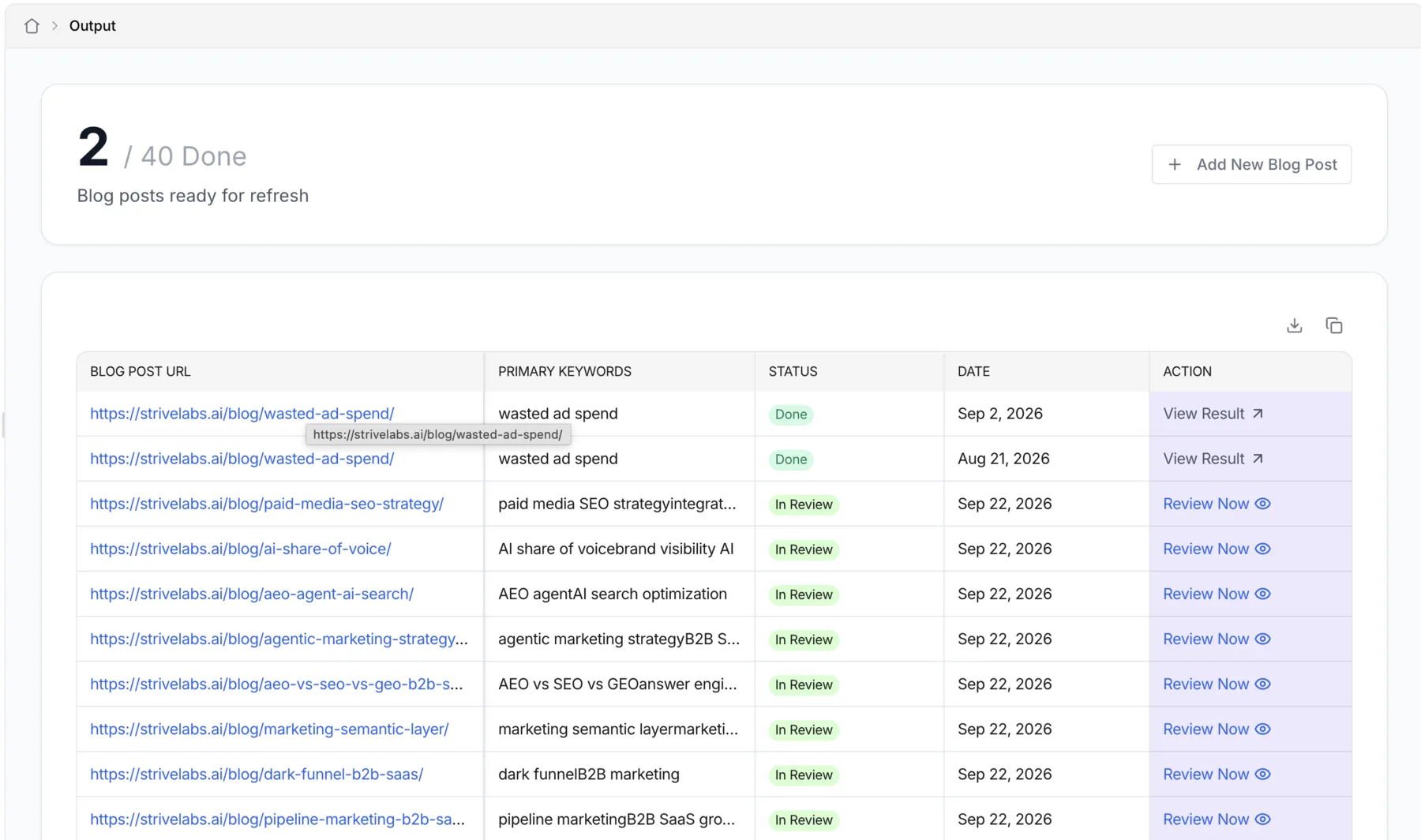
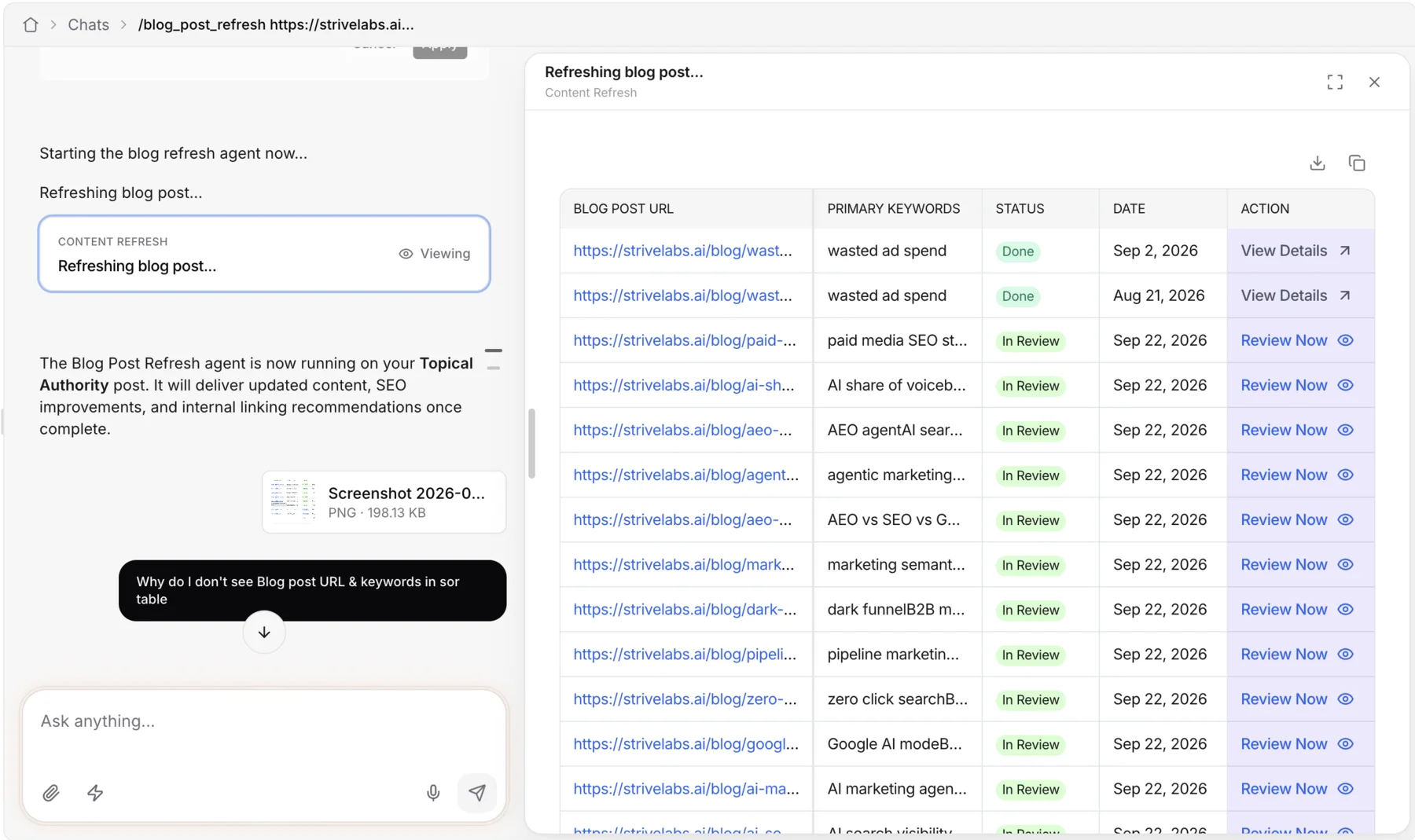
Nothing was thrown away. It moved into the chat.
How we built that engine is a story of its own, and it has its own post.
Let the agent write its own UI
Chat composes UI from our own components, which is right where consistency matters. Reports needed something looser: big volumes of data, layouts nobody could predict, and a story you get in one scan.
So for reports we went one step further, and let the agent write the interface itself, as HTML in a sandboxed canvas.
Strive chat
tool call → our renderer
one HTML file → a sandboxed canvas
That one is the story of Strive Studio. For this post, what matters is the shape of the whole journey. My job moved from writing screens, to writing the rails others build on, to writing the taste an agent builds with.
And reports are only the start. Letting the agent write its own code is where we’re heading.
What I’d keep
- Compete where you can stand out. We put our effort into reliable agents, not into one more agent builder.
- Make the right way the short way. Builders called hooks instead of touching the store, because hooks were less work.
- The easiest path should be the consistent one. Only
ui-corein the template meant consistency came for free. - Relax the rails before they break. A content agent and a sales agent don’t need the same shape.
- Write the guide for every reader. People and coding agents read the same page, and agents follow it literally.
- Move the template the day the pattern moves. The scaffold is the doc people actually copy.
- Abstractions buy speed, not scale. Once agents had to work together, the answer was one surface, not a faster way to build many.
On one timeline
What’s next
- Custom apps. People building their own apps inside Strive, not just reports, to solve their own problems and automate their work.
- Agents as a team. Agents working together, not in silos.
- A multiplayer agentic Marketing OS. Where all of it comes together.
We started by making agent UIs cheap to build. We ended up letting the agent build them. We’re already in that final stage, and excited for what’s ahead.
Thanks
Agent UI on Strive is a team effort, from the workflows and agents underneath to the people who built on the scaffold and told us where it hurt. Thanks to our CTO for the idea of screens that started it all, and to the whole team at Strivelabs for building it together.