The studio

Strivelabs · Blog refresh

Reviewing an agent’s edits, block by block

Strive’s blog refresh agent reads an old post, finds what’s out of date and suggests changes. This is how we made reviewing dozens of suggestions feel like editing one post.

My part
Frontend: the editor, the review flow, and keeping suggestions in sync with the post
Built with
The Strive team
Status
Live
Live today: feedback on a suggestion, approve, then on through the post.

Backstory

An agent that refreshes old posts

  • Share a blog post, and the agent reads it block by block, checks it against search, AI overviews and competitors, and suggests what to update. You review, then publish the refreshed post.
  • We built it as a team. I owned the frontend: setting up the editor, designing how review works, and keeping suggestions in sync with the post.

The brief

A lot to fit beside a post

  • Many controls

    Approve, reject, feedback, locate and undo, on every suggestion.

  • Many suggestions per block

    One paragraph can have three, from different sources.

  • State in sync

    Act on a suggestion, and the post and the counts follow.

  • One view

    The post and its review side by side, never a separate page.

Phase 1 · the prototype

Would people want this?

  • We first built it to test the demand, not to ship. It wore the orange theme Strive had then.
  • It showed people wanted it. It also showed what made review tiring.
The prototype: approve from a popover, comment on a block, then the recommendations panel.
  1. A sparkle per suggestion. Buttons on the block’s edge, stacked when a block had more than one.
  2. A popover over the text. The change you were judging hid the words it was about.
  3. Every block in yellow. With suggestions on most blocks, the highlight stopped meaning anything.
  4. The same cards, twice. The panel repeated the popovers: two places to act, two states to keep in sync.
The prototype. It proved the need, and showed what to calm down.
Two suggestions, two sparkles. Which one is this?
Feedback on a block, in a popover of its own.
Muted sparkles that didn’t read as buttons.

Phase 2 · the redesign

The post is the review
  • Once the demand was clear, I redesigned the review: suggestions sit on the text they change, and one panel holds every action.
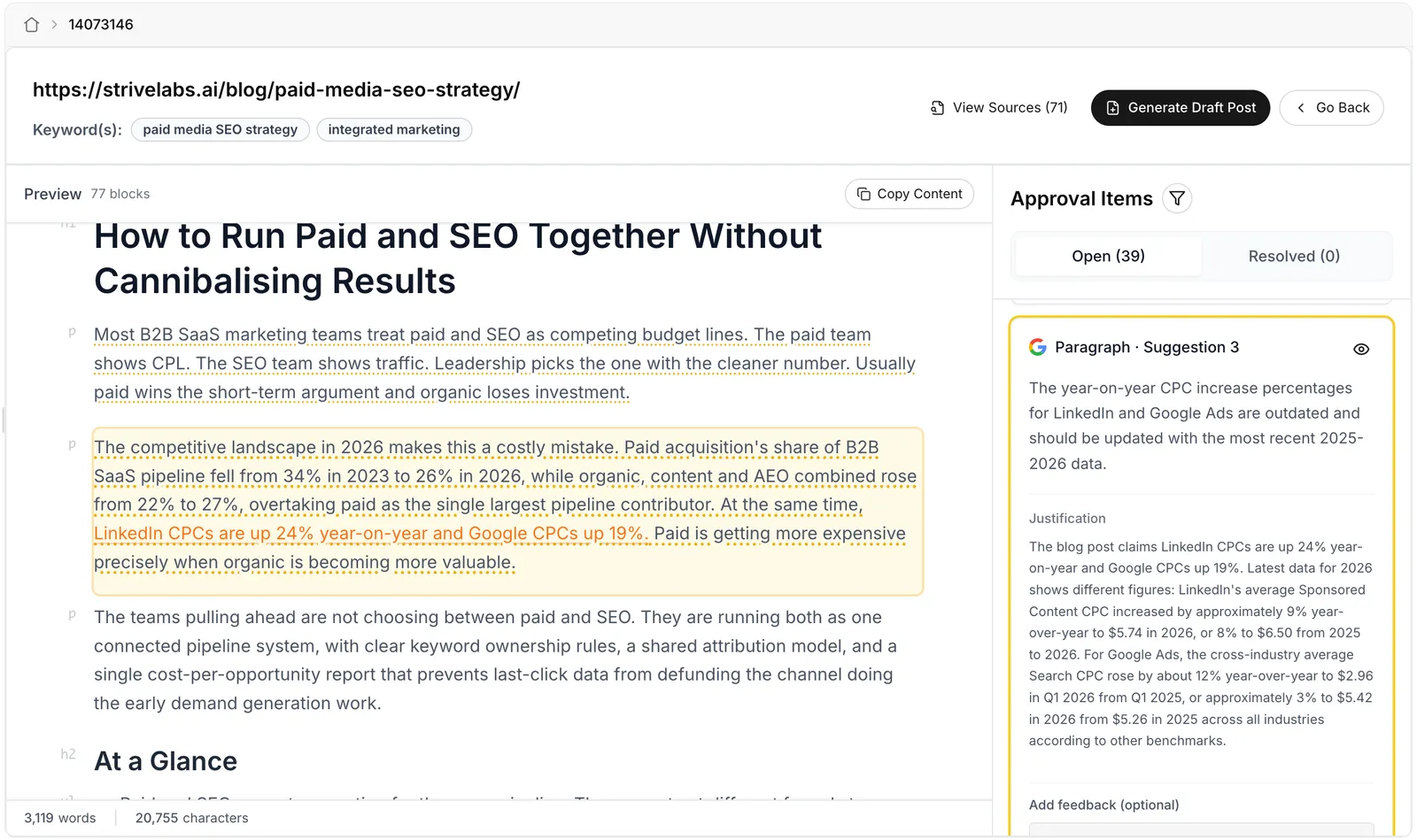
The live review: the post on the left with p and h2 labels in the gutter and dotted underlines under text that has suggestions. One paragraph is highlighted, with the phrase about LinkedIn and Google CPCs in orange. On the right, Approval Items with Open 39 and Resolved 0 tabs and a filter, and the matching card, Paragraph · Suggestion 3, with a Google icon, an eye button, the suggestion, its justification and a feedback box.
  1. Block types in the gutter. p, h2, table: the post as the agent reads it.
  2. A dotted underline. Quietly marks text with suggestions, without tinting the whole post.
  3. Card and block, in sync. Select a card and its block lights up, with the exact phrase in orange. The eye scrolls to it.
  4. Open and Resolved. Counts that move as you act, and a filter.
  5. Where it came from. Each suggestion shows its source: search, AI overviews, competitors and more.
Live today. The team later added the source icons, a filter by source, and the sources and keywords in the header.

Beyond suggestions

Ask for what the agent missed

  • People wanted changes the agent didn’t suggest. So any block takes a comment, and the agent works it in with the rest.
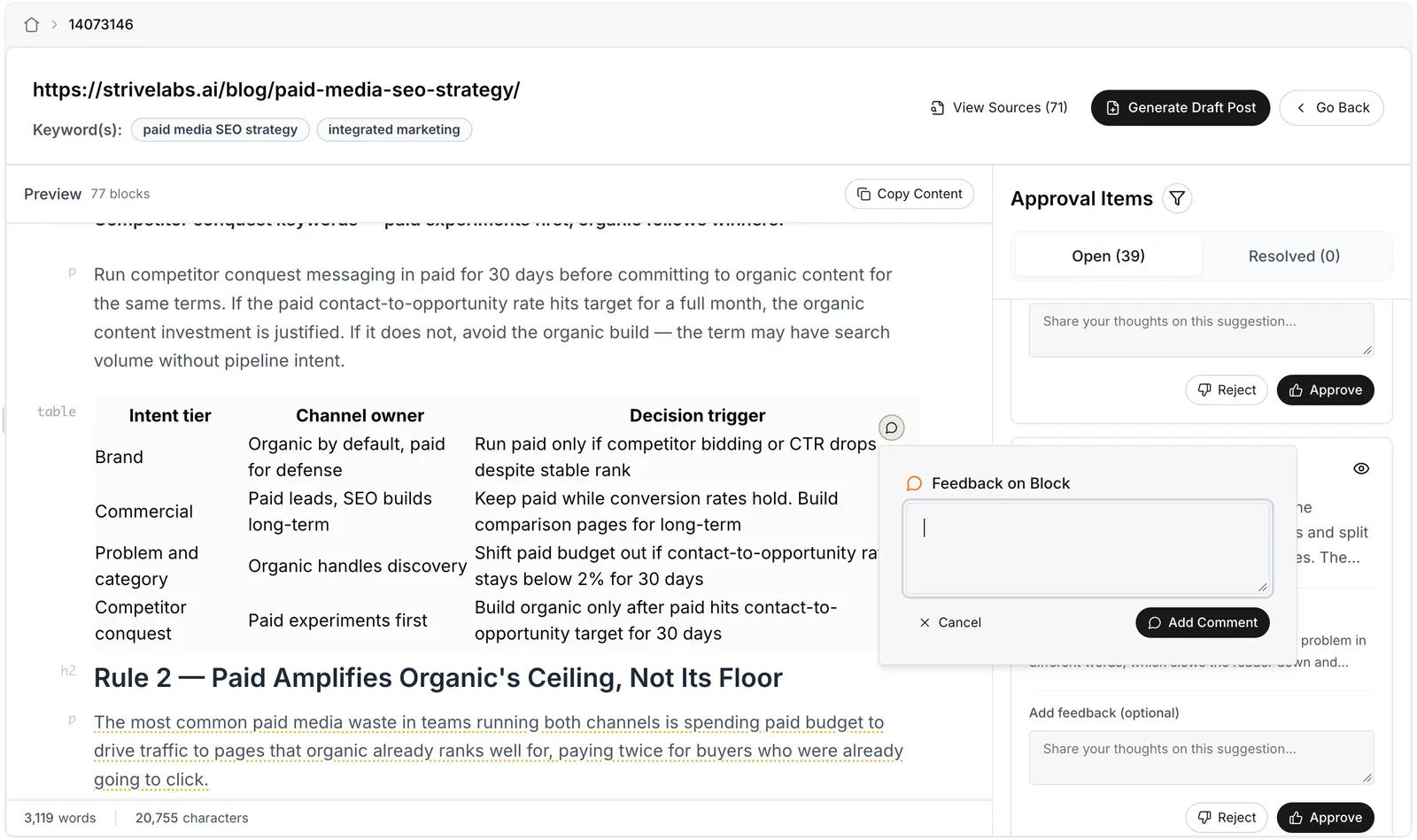
The live review: a table in the post with a comment button on its top right corner, and a Feedback on Block popover open beside it with a text box, Cancel and Add Comment. Suggestion cards with Reject and Approve stay in the panel behind it.
  1. Any block. Paragraphs, headings, lists, tables too.
  2. A comment button on hover. Out of the way until you point at a block.
  3. Feedback on block. Beside the block, not over it.

States

Every click says what happened

  1. Open
  2. Feedback, if any
  3. Approved or rejected
  4. Undo
  • Once you act, a card shrinks to your feedback and its state, with Undo right there. A toast confirms it.
Feedback, approve, and the card settles into its new state.

Before · after

Same job, calmer page

Before

After

What dried

What I’d keep

  • LessonA suggestion belongs on its text, not on a button floating beside it.

  • LessonOne place to act. Two places means two states to keep in sync.

  • LessonWhen every block is highlighted, nothing is.

Every suggestion, one place to act.

Thenga’s studio + yard